
logo
  • Home
  • About
  • Contact
  • Privacy Policy
  • Business
  • Featured Articles
  • freebies
  • General
  • Google
  • internet
    • Domains
    • Web Design
  • Orkut
  • politics
"Love is the delightful interval between meeting a beautiful girl and discovering that she looks like a haddock." -John Barrymore
delete
bookmark bookmark bookmark bookmark bookmark bookmark bookmark bookmark bookmark bookmark bookmark bookmark

Whois script for personal pc with windows

Posted by admin in Featured Articles, internet on 12 13th, 2009 | 5 responses

check Whois within command prompt of windows PC

People who familiar with whois in linux may feel they miss that in windows but there is a small whois utility to check the domain whois within command promot of our windows machine.

Recently i got this tiny utility for checking whois from microsoft website.

You can visit this microsft Link to get that file.

download that zip file and you can use that as its a standard exe file. You can use that file in the curreent folder of command prompt or you need to copy that exe file to your pc path folders noramlly it will be c:\windows

and you can start using that directly.

1) download the file using above link (its in microsoft site so no need to worry)
2) extract that file and place that whois.exe in your c:\windows folder
3) click on Start button in windows click on Run and open a command prompt using CMD command

now u can use that command directly as

Usage whois domainname (whoisserver)

Domainname can be either a DNS name (e.g. www.sysinternals.com) or IP address (e.g. 66.193.254.46).

whoisserver is optional but you need to supply a whoisserver if the utility gives error as there are lot of tlds are exist its not easy task to them to list all whois servers.
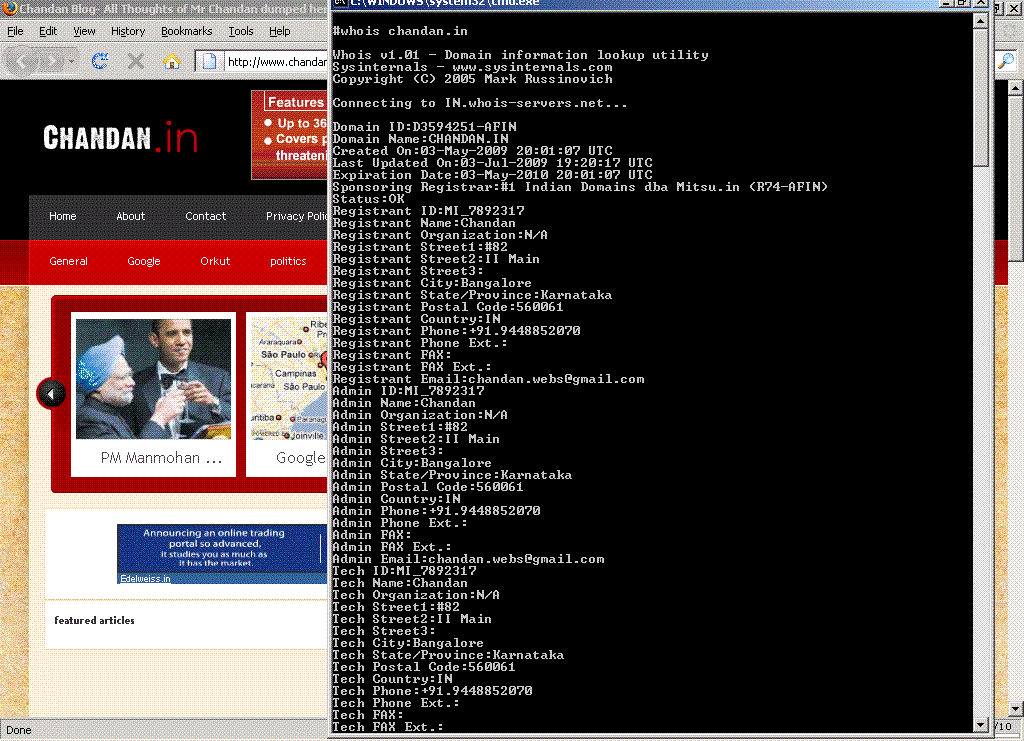

windows whois utility

5 Responses to “Whois script for personal pc with windows”

  1. uptraffic says:
    03/02/2010 at 11:15 am

    Nice script but available to run on window would be better

  2. admin says:
    03/02/2010 at 1:18 pm

    well this is for windows only ;)

  3. catchnames says:
    21/06/2010 at 10:16 am

    Thank you. How do you check domain names on daily basis? Using automated tool.?

  4. chandan says:
    08/07/2010 at 4:12 am

    LLL.ins we can scan monthly

  5. Stop Apnea says:
    19/05/2011 at 10:30 am

    Cool, this will be a handy little script. Is there any limits on how often you can call the script if you had a few domains you wanted to look up?

Leave a Reply

Click here to cancel reply.

  • Sponsors
  • Recent Posts
  • Recent Comments
  • About
  • airtel 2Mbps for just Rs100 More
  • funny arranged marriage invitation
  • Youtube online video editor
  • expired .in domains
  • Cheap Flights And Vacations Save Some Bucks For Your Shopping
  • Paypal Makes Million dollars from 10 days
  • paypal removed gift option.
  • available LLL.mobi List
  • Kamal Abeysingha In these days buying is a fashion and also informations are valuble for people all ov...
  • Achille please can yu tell me why i get this. Notice: Undefined index: domain in C:\wamp\w...
  • Subash Ghimire Thanks for the Script admin ! As i am a website designer it is very helpful to me bec...
  • Sarah Khan its really informative site.... :-) thums up :)...
About us
  • Blog Roll
  • archives

Blogroll

  • Dropped Domains
  • Food Recipes
  • Free SMS India
  • Jokes Blog
  • stumble
  • March 2011
  • February 2011
  • June 2010
  • May 2010
  • February 2010
  • January 2010
  • December 2009
  • November 2009
  • October 2009
  • June 2009

categories

  • Business
  • Featured Articles
  • freebies
  • General
  • Google
  • internet
    • Domains
    • Web Design
  • Orkut
  • politics

Search

  • Sponsors
  • Admin
  • visitors
food recipes blog advertisement
  • Log in
© Chandan Blog 2009 | chandan | kannada | directory | Indian Blogs | Powered by Wordpress | Elegant Themes